>> Home / Tutorials / Mesh Networking, Reticulum
Using Reticulum with Meshchat
∵ brooke ∴ 2025-09-01 ∞ 5'
What is Reticulum?
Reticulum is a networking protocol with the goal of creating self healing "unstoppable networks" that utilize almost any interface. Example interfaces are Wi-Fi, Ethernet, Fiber optic, LoRa, a TNC KISS modem, etc. Reticulum's method of using interfaces is unique compared to existing networking standards as it allows you to use any number of interfaces at the same time. Reticulum's example spec is written in Python and is available on pypi, versions written in Zig, Rust, Go, Java, and more are underway.
Reticulum's example Python spec includes a number of example applications like rnphone which you can use to call another reticulum device from the command line, or rnsh which allows you to get a remote shell on trusted reticulum devices.
Reticulum is not a network but rather a tool for making networks. Networks can consist of mostly "human powered" devices like a text messaging client, or networks can be used for IOT (Internet of Things) devices like thermostats, GPS trackers, etc.
Reticulum-based programs are the easiest ways to use the protocol if you are not a developer, these programs allow you to text, call, and serve web pages from your computer that other devices on the network can access. Applications are available for the web, desktop, android, or from your terminal. Meshchat is one of these clients which I will be walking through in the next section.
Meshchat quickstart
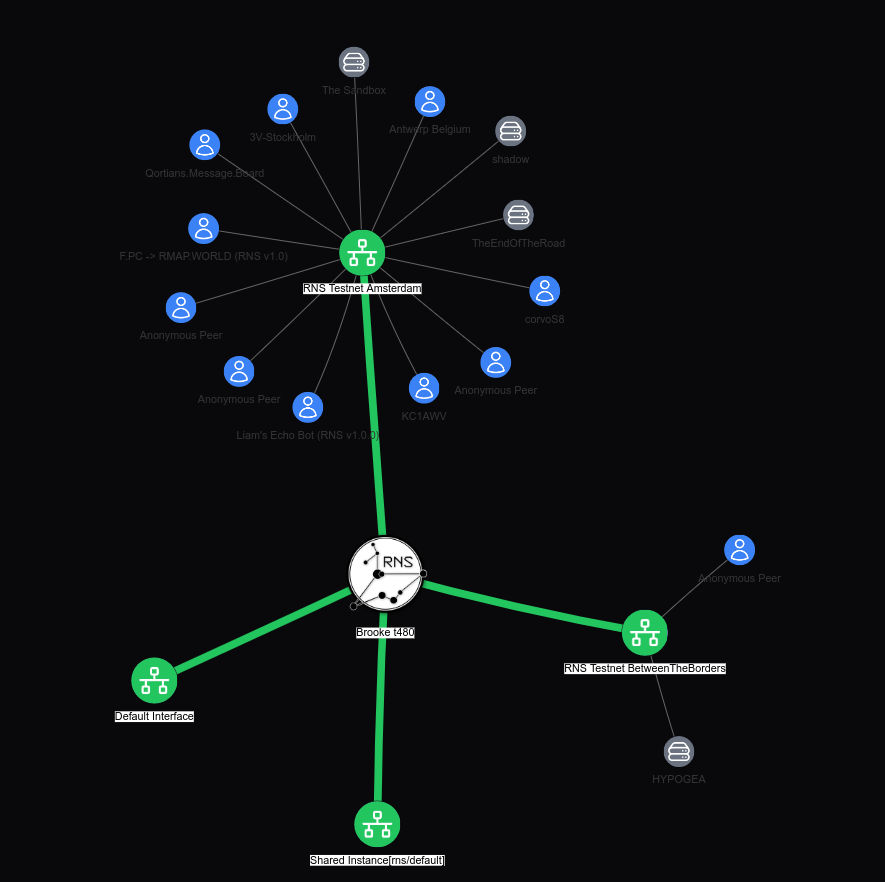
Meshchat offers the most user-friendly experience for people unfamiliar with Reticulum, it also has a unique network visualizer that lets you "see" other devices on the network and which interface you have discovered them on.
- Install
Head over to the Meshchat Github releases page and download the release for your computer.
At this point, follow the relevant process for installing applications on your computer. For Linux a straight forward process of installing an AppImage might not be available and on some distribtions AppImages are not launchable. Unfortunately there is not an alternative process as of writing.
- Adding interfaces
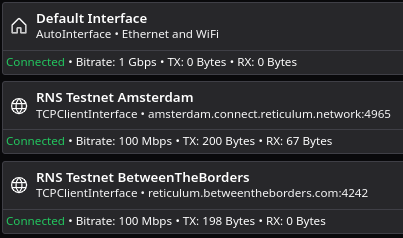
If you were able to complete an installation of Meshchat, then launch it now. Click the tab on the left labeled Interfaces and download the file meshchat_interfaces.txt. You should see an option to Import at the top of the Meshchat window, click this and select the meshchat_interfaces.txt file when prompted. At this point you should restart Meshchat. If this operation was successful you should see 4 interfaces: Default Interface, RNS_Transport_US-East, RNS Testnet BetweenTheBorders, and mobilefabrik TCP.
Every interface should read online and you should see the number next to RX going up.
- Using Meshchat
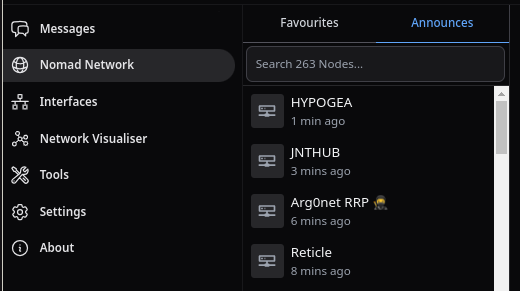
Now you can start browsing the two test networks you've joined either by checking the announcements for Nomad Network or by using the Network Visualiser and double-clicking the gray server icons. You can also checkout the Sandbox ATL Nomadnet page by pasting this url into the Nomadnet browser bar 99c742f7f3bd5c832f537cdddbf62d9a:/page/index.mu.
An example of what announces should look like if your interfaces were configured correctly.
A screenshot of the network visualiser on my Meshchat client after running for a few minutes.
FAQ
Why can't I see anyone? Devices on Reticulum need to announce their presence before you are able to see or contact them, this is subject to change as more server components for the network that could speed up this process are added. I'd just recommend patience.
What are "hops"? Next to every destination (person or server), you should see a status message that tells you how many hops it took to reach this destination. This is an indication of how many devices your message was relayed over before it reached the destination. As Reticulum networks try to enable broad access, some destinations can operate as Transport nodes. These are usually high uptime stationary servers that rebroadcast your message to another transport node or to your destination. Whichever node receives this re-broadcasted message is decided by a simple algorithm that attempts to select for the most efficient route.
Further reading
Reticulum Wiki FAQ - https://github.com/markqvist/Reticulum/wiki/Frequently-Asked-Questions
"Awesome Reticulum" A list of Reticulum and adjacent software - https://awesome-reticulum.net/
A Comparison of Reticulum to other projects - https://github.com/markqvist/Reticulum/wiki/Comparison-to-other-projects
Nomadnet pages to checkout
THE CHAT ROOM - d251bfd8e30540b5bd219bbbfcc3afc5
A fun and fairly welcoming IRC-style group chat.
XMesh! - 33b2c1d21917ce564eb0631302e6689e
A low traffic social media network supporting "re-transmits", replies, and likes.
HTML Browser - aef10ff6b4b19c48deba8c50b02ae328
An HTML search engine that live converts the HTML to Micron files that nomadnet can recieve